Posts

Share Point Videos

Image
Share point videos

Print Screen ShortCuts

Press PrtSrc (Print screen) Prints the entire screen. Press Alt + PrtSrc (Print Screen) Print the select area.

Mouse wheel events do not work in the Visual Basic 6.0 IDE

Image
Download the VB6 Mouse Wheel.exe file that includes the add-in DLL and the code that is used to create the add-in DLL. Download the VB6 Mouse Wheel.exe file. The following file is available for download from the Microsoft Download Center: Download the VB6MouseWheel.EXE package now. For more information about how to download Microsoft support files, click the following article number to view the article in the Microsoft Knowledge Base: 119591   How to obtain Microsoft support files from online services Microsoft scanned this file for viruses. Microsoft used the most current virus-detection software that was available on the date that the file was posted. The file is stored on security-enhanced servers that help prevent any unauthorized changes to the file. Click  Start , click  Run , type  regsvr32 <path>\VB6IDEMouseWheelAddin.dll , and then click  OK . Start Visual Basic 6.0. Click  Add-Ins , and then click  Add-in Manager . In the...

Easy Javascript validations.

Click Here

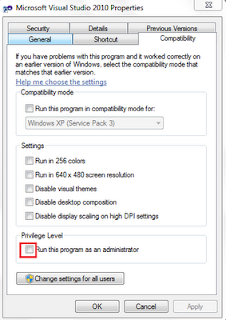
RUN VISUAL STUDIO AS ADMINISTRATOR

Image
Step 1: Create visual studio shortcut on the desktop. Step 2: Right click on the shortcut and go to properties and select compatibility tab and select "Run this program as administrator" checkbox.[Refer below figure for reference]. Step 3: Go and click the shortcut visual studio will be opened with administrator privileges.

Disable "Right Click" using javascript

Place the below code in Head section of your HTML page <script TYPE="text/javascript"> <!-- //Disable right click script var message="Sorry, right-click has been disabled"; /////////////////////////////////// function clickIE() {if (document.all) {(message);return false;}} function clickNS(e) {if (document.layers||(document.getElementById&&!document.all)) { if (e.which==2||e.which==3) {(message);return false;}}} if (document.layers) {document.captureEvents(Event.MOUSEDOWN);document.onmousedown=clickNS;} else{document.onmouseup=clickNS;document.oncontextmenu=clickIE;} document.oncontextmenu=new Function("return false") // --> </SCRIPT>

Creating Your First WCF Service

"Creating Your First WCF Service"